
How to monetize with dynamic ads
Dynamic ads are inserted into your episodes at playback time, so you can earn from new and old episodes. Payouts are automated.
Before you start
- Your show needs to be hosted natively on PodManager for dynamic ad insertion to work.
- Set up your payout details so earnings can be paid out.
- 1
Open monetization
Go to the monetization area and review your eligibility and ad settings.
- 2
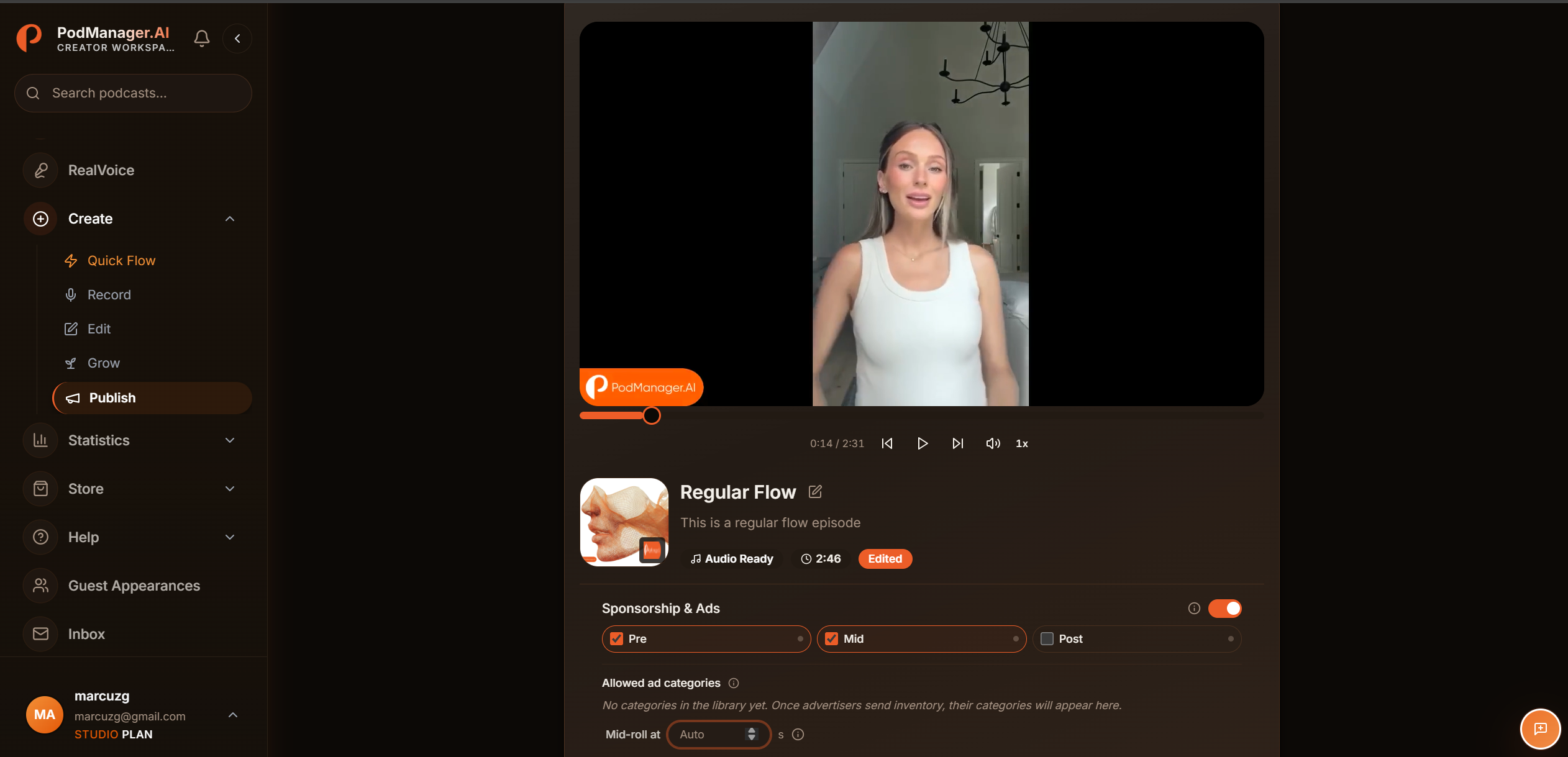
Choose your ad slots
Enable pre-roll, mid-roll, or post-roll slots, and set where mid-rolls are placed.
- 3
Set ad categories
Pick which ad categories you accept or block, so the ads match your show and audience.
- 4
Connect payouts
Connect your payout account so earnings accumulate in your wallet and can be withdrawn.
- 5
Track earnings
Watch ad performance and your balance in the wallet, and withdraw when you are ready.
Tips
- Dynamic ads apply across your catalogue, so even older episodes can earn.
Frequently asked questions
- Do I need a large audience to turn on ads?
- You can enable ad slots early. Fill and revenue scale with your downloads, so the value grows as your show grows.